
IoT project
About the project
I developed an application to measure temperature, humidity, and water level. It's designed for flood detection in home scenarios - the controller should be placed under the sink, near the washing machine, or dishwasher. The project consists of 4 parts - an Arduino app, a backend for handling data from MQTT, and a mobile application to present current metrics and events with alarm data. I'll describe each part as briefly as I can.
The Arduino part
I used an IoT controller like this one from Botland.
I used two sensors with this IoT controller:
- DHT11 - reads temperature, humidity, and heat index.
- Iduino SE045 - reads liquid level
The controller has a Wi-Fi module to simplify TCP/IP connections. In my case, I used the popular MQTT message broker mosquitto running in Docker eclipse-mosquitto. Every 5 seconds, the system reads data from the sensors and publishes it to the MQTT broker. All the Arduino code is available here.
Backend
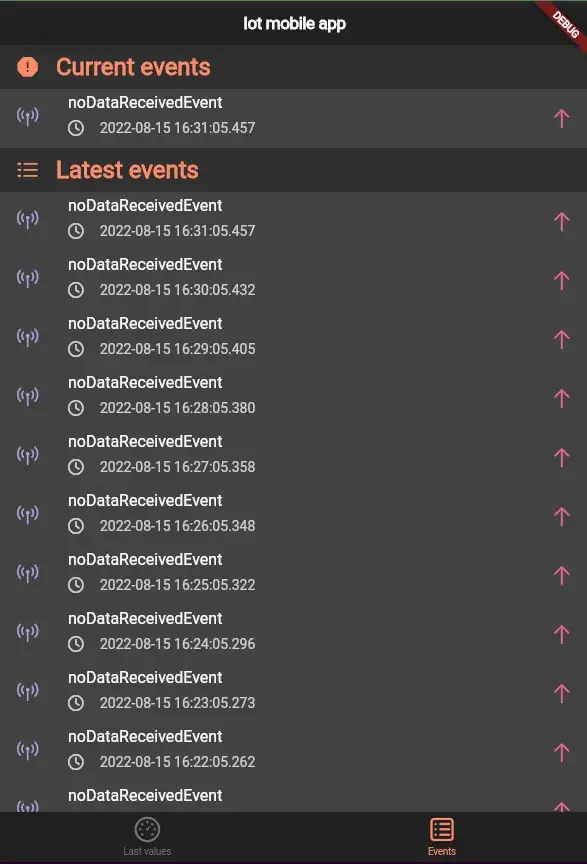
This is a bridge between the MQTT broker data and the mobile application. The repository is here. I subscribed to the MQTT topic /water_leak/detection and analyzed data from MQTT packages in the backend application. It's worth mentioning the mechanism for detecting missing packages. By detecting missing packages, I mean checking the time since the last data arrived (if one minute elapses, I raise a noDataReceivedEvent). Of course, the backend has logging, and events and data are stored in files, so if the application restarts, I retrieve the current day's events and data. You can retrieve events from the REST endpoint, but the latest value data is emitted via websockets.
Mobile application
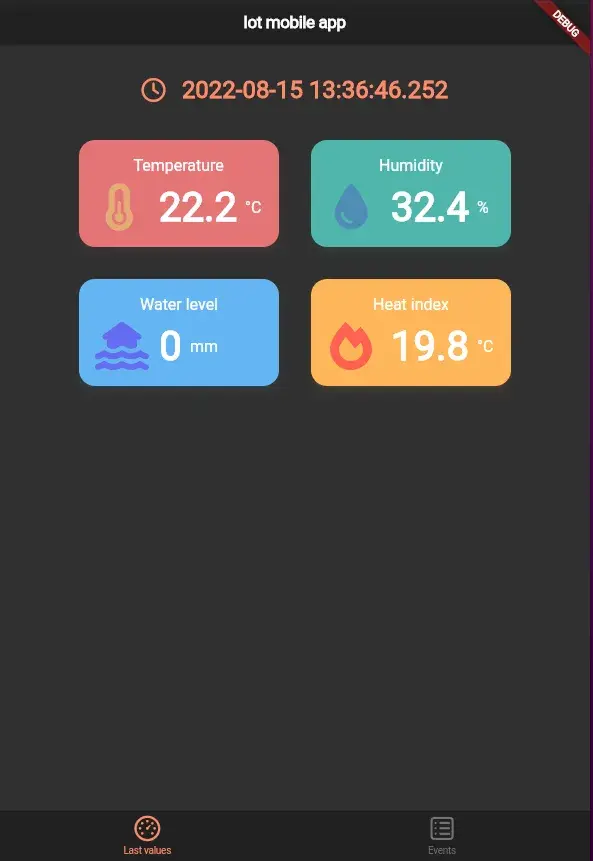
I decided to create a mobile application in Flutter using the Dart language. You might ask: why not create an app in React Native, since you know React and it shouldn't be a problem to do it faster? I understand your reasoning. But I'm a developer who loves learning new things, and Flutter is not as complicated as you might think. It has great documentation, and for me, it's easy to use, popular, and has nice syntax :) The best thing is how easy it is to create components/widgets in Flutter. Check out the repository to see how the application looks. In my app, I use IOWebsocketChannel for websockets and the default HTTP Dart package to make REST calls. In the app, I focused on iOS, so the code has specific components for iOS. Of course, in Flutter, just like in React Native, there are some components only for iOS and Android, but there are a lot of common components. I didn't expect that someone else would use my application, so I debug the app on iOS. But maybe someday I'll change it to Android too ;)
Here's how my app looks: