

Building a Cyberpunk Voxel City: An Interactive Resume in WebGL
What is This?
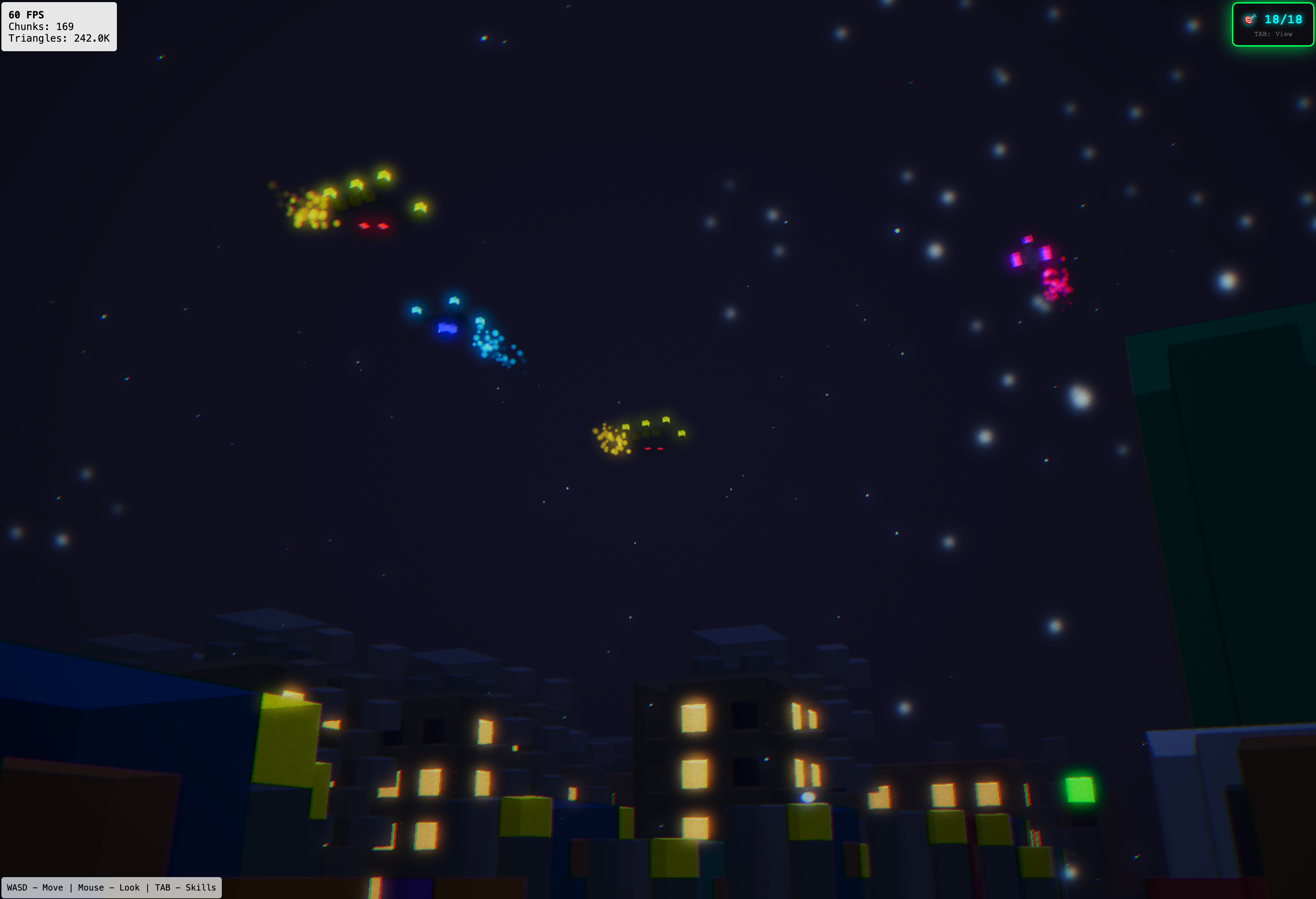
This is an interactive resume disguised as a browser-based game. Instead of reading a traditional CV, visitors explore a sprawling cyberpunk city rendered entirely from voxels (3D pixels), discovering skill boxes that represent my technical expertise. Think Minecraft meets Blade Runner, but it runs in your browser without any downloads or plugins.
The Challenge
Traditional resumes are static and boring. Portfolio websites can be engaging, but they're still just pages you scroll through. I wanted to create something memorable - an experience that would:
- Stand out from typical developer portfolios
- Demonstrate technical skills through the medium itself
- Run smoothly in any modern browser without installation
- Handle large-scale procedural world generation efficiently
- Create an immersive cyberpunk atmosphere with dynamic lighting and effects
- Work on both desktop and mobile devices
Project Overview
You can experience the live application at 3dresume.kjaniec.dev. The game is a fully interactive 3D world built with WebGL, featuring a streaming chunk system that can render cities spanning thousands of blocks.
Technical Architecture
Core Technology Stack
The game is built with:
- Babylon.js 7 - Powerful WebGL rendering engine with excellent TypeScript support
- TypeScript 5 - Type-safe game logic and world generation
- Vite - Lightning-fast dev server and optimized production builds
- Custom voxel engine - Chunk-based streaming world with greedy meshing optimization
Here's the complete dependency setup:
{
  "name": "cyberpunk-resume-game",
  "private": true,
  "version": "1.0.0",
  "type": "module",
  "scripts": {
    "dev": "vite",
    "build": "tsc && vite build",
    "preview": "vite preview"
  },
  "dependencies": {
    "@babylonjs/core": "^7.0.0",
    "@babylonjs/loaders": "^7.0.0",
    "@babylonjs/materials": "^7.0.0"
  },
  "devDependencies": {
    "typescript": "^5.4.0",
    "vite": "^5.4.0"
  }
}
The minimal dependency footprint keeps the build fast and the bundle size reasonable. The entire game, including Babylon.js, compiles to a 5.2MB distribution package (under 1.5MB gzipped).
The Voxel Engine
At the heart of the game is a custom voxel rendering system designed for performance:
125+ Voxel Types
The game defines 125+ distinct voxel types spanning:
- Terrain & Infrastructure: Roads, sidewalks, concrete, water, sand
- Building Materials: Various glass types, metals, bricks, weathered concrete
- Cyberpunk Elements: Neon signs (pink, cyan, orange, purple, green), hologram projections
- Urban Details: Street lamps, traffic lights, AC units, satellite dishes, steam vents
- Port Structures: Shipping containers, corrugated metal, industrial materials
- Skill Boxes: 18 glowing collectible skills + 18 muted "collected" variants
Each voxel type has an RGB color value, with values >1.0 creating emissive glow for the bloom post-processing effect.
Greedy Meshing Algorithm
Instead of rendering each voxel as 6 separate faces (which would create millions of triangles), I implemented a greedy meshing algorithm that:
- Scans each layer of voxels in a chunk
- Groups adjacent voxels of the same type into larger quads
- Only renders visible faces (culling faces between solid blocks)
- Reduces triangle count by 80-95% compared to naive voxel rendering
This optimization is critical for maintaining 60 FPS while rendering a city with hundreds of buildings.
Chunk-Based Streaming
The world is divided into 16x16x16 voxel chunks. The ChunkManager:
- Loads chunks within viewing distance (default: 4 chunks = 64 blocks radius)
- Unloads distant chunks to conserve memory
- Uses spatial hashing with
"chunkX,chunkZ"keys for O(1) chunk lookup - Refreshes individual chunks when skills are collected (removes glow effect)
Procedural City Generation
The city layout uses a distance-based concentric zone system from the city center:
// Zone allocation based on distance from origin
Core Districts (0-15 blocks):     Entertainment, Neon Market, Retail
Mid-City (15-30 blocks):          Corporate Plaza, Commercial District
Residential (30-55 blocks):       High-rise and mid-rise apartments
Suburban (55-70 blocks):          Markets, tech shops, parking lots
Industrial (near water):          Port structures, container stacks
Boundaries (70+ blocks):          City walls, wasteland, void
Building heights, densities, and architectural styles vary by zone, creating a believable urban landscape. The procedural generation ensures the city is different every time while maintaining coherent districts.
Skill Collection System
The game features 18 collectible skills organized into 6 categories:
- Neural Core (Cyan): Java, Python, Node.js
- Interface Deck (Pink): Angular, React, Flutter
- Cloud Nexus (Purple): Kubernetes, Docker, AWS/GCP
- Data Vault (Green): PostgreSQL, Redis, Elasticsearch
- Architect's Eye (Orange): System Design, API Design, Security
- Bonus Augments (Gold): CI/CD, Git, Terminal
Each skill is a floating, rotating voxel box with an emissive glow. When collected:
- The voxel type changes from glowing to muted (+18 type offset)
- The chunk is refreshed to update the mesh
- A popup displays skill details
- The HUD counter updates
- Progress is tracked (but not persisted - each session is fresh)
Visual Effects Pipeline
The game uses Babylon.js post-processing for a cinematic cyberpunk aesthetic:
Bloom Effect
- Threshold: 0.1 (very sensitive - catches subtle glows)
- Weight: 0.8 (strong bloom intensity)
- Kernel: 64 (wide glow spread)
- Makes neon signs, skill boxes, and street lights radiate light
Additional Effects
- Chromatic Aberration: Subtle RGB color split at screen edges
- Film Grain: Adds texture and atmosphere
- Exponential Fog: Purple-tinted distance fog for depth
- Glow Layer: Intensity 2.5 for strong neon effects
Dynamic Systems
- Rain Particles: GPU particle system with 2000+ droplets
- Steam Vents: Rising particle effects from street grates
- Neon Animation: Flickering brightness on signs (time-based sine waves)
- Skill Box Animation: Floating rotation + vertical bobbing
Performance Optimizations
Greedy Meshing
The single biggest optimization - reduces polygon count from ~6 million to ~300k triangles for a typical view.
Chunk Culling
Only chunks within view distance are loaded and meshed, keeping memory usage reasonable.
Vendor Code Splitting
Vite configuration separates Babylon.js (~2MB) into a separate chunk for better caching and faster incremental builds.
Material Reuse
Single standard material for all voxels, with vertex colors determining appearance - eliminates material switching overhead.
Platform Support
Desktop Controls
- WASD: Movement
- Mouse: Look around
Mobile Controls
- Virtual joysticks for movement and camera
- Touch-optimized UI with larger interaction areas
- Responsive layout for skill collection popups
Design Decisions and Trade-offs
Why Custom Voxel Engine Instead of Three.js/Babylon Built-ins?
I needed precise control over meshing and chunk streaming. While Babylon.js provides the WebGL rendering layer, the voxel system, greedy meshing, and world generation are custom implementations optimized for this specific use case.
Why No Persistence?
Each page refresh starts a fresh game. This was a deliberate choice:
- Keeps the codebase simpler (no localStorage/backend)
- Encourages exploration rather than checkbox completion
- Makes testing easier during development
- Visitors can experience the full city each visit
If I were building this for actual gameplay, I'd add localStorage persistence and maybe even a backend for global leaderboards.
Why Babylon.js Over Three.js?
Both are excellent, but I chose Babylon.js because:
- Better TypeScript support - Built with TypeScript from the ground up
- Comprehensive scene graph - Easier to manage complex 3D scenes
- Built-in post-processing - Bloom, grain, chromatic aberration out of the box
- Excellent documentation - Clear examples and playground
Entity System Simplicity
Traffic, pedestrians, and drones use simple path-following logic rather than full ECS (Entity Component System) architecture. For this scale (dozens of entities), simple update loops are more maintainable than adding framework complexity.
Development Experience
The project includes a CLAUDE.md file with detailed guidance for AI-assisted development, covering:
- Architecture overview and system boundaries
- Development commands and build process
- Important patterns (voxel types, chunk system, color values)
- File organization and where to make changes
This makes it easy to extend the game with new features, voxel types, or visual effects.
What I Learned
Building this project taught me about:
- Voxel optimization techniques - Greedy meshing is fascinating and challenging to implement correctly
- Procedural generation - Balancing randomness with structure to create believable cities
- WebGL performance - Understanding draw calls, vertex buffers, and GPU limits
- Post-processing pipelines - How bloom, grain, and chromatic aberration create atmosphere
- Chunk streaming systems - Spatial hashing, view frustum culling, dynamic loading
- Mobile browser limitations - Performance constraints, touch event handling, virtual controls
The biggest surprise? How much performance matters in the browser. I spent as much time profiling and optimizing as I did building features. The greedy meshing implementation alone took three iterations to get right.
Future Enhancements
If I continue developing this, potential additions include:
- Multiplayer - See other players exploring the city (WebSocket + shared world state)
- Skill Details Modals - Expand collected skills to show project examples
- Building Interiors - Enter buildings and explore interior spaces
- Quest System - Guided paths through the city with challenges
- Day/Night Cycle - Dynamic lighting with sunrise/sunset transitions
- Save System - Persistent progress across sessions